Unraid Connect
Remote server access with tunneled GraphQL over WebSocket, a Vue 3 PWA dashboard, server identity work, and a clear trust boundary.
- Client: Unraid
- Role: GraphQL, WebSockets, Remote Access
- Recognition: Remote access
- Year: 2026
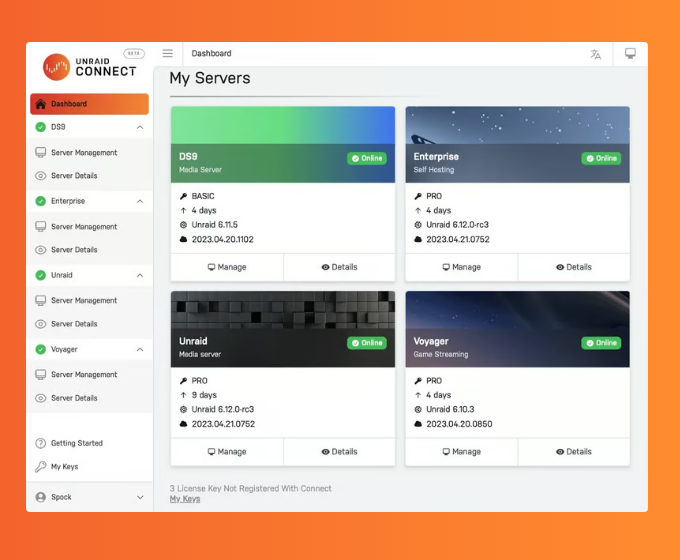
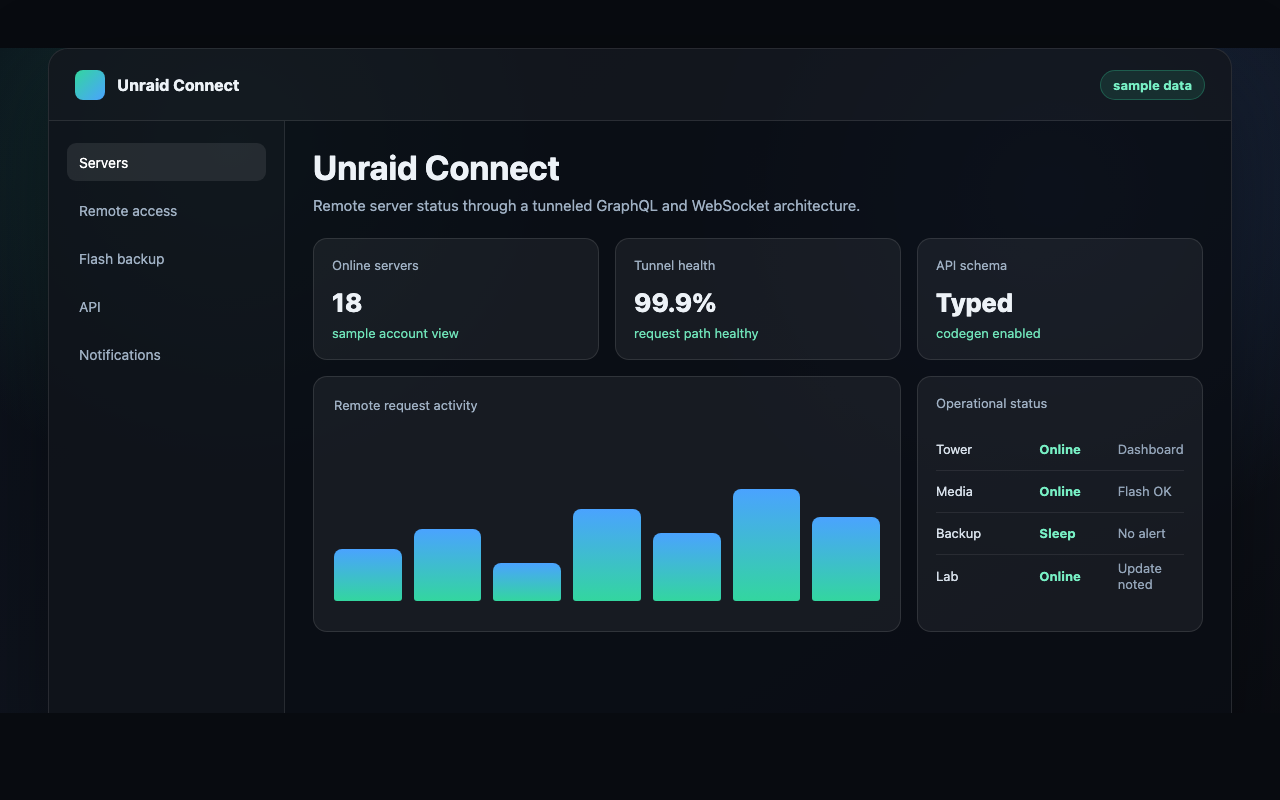
Remote access for user-owned servers
Unraid Connect sits on a tricky product boundary. People want cloud convenience for servers they own, but an Unraid box is not a SaaS backend. These machines live in homes, labs, and small businesses. They sit behind NAT, run on mixed hardware, sleep, reboot, drop off the network, run on IPv6-only links, or get managed by someone whose technical background is a weekend of YouTube.
I led engineering on Connect from its first commits in late 2022 — I wrote roughly 44% of the web app and was a core author on Mothership, the cloud gateway behind it — including the tunneled GraphQL model. That model lets cloud services query data from a user’s server without treating that server like a public API. The product goal: make remote status, dashboards, account linkage, and management feel modern while keeping the server the user’s own.
The hard product boundary
Remote access products usually put the cloud at the center. Connect needs the opposite. The local server stays the source of truth for almost every piece of state that matters. The cloud surface handles account-level access, remote visibility, and product integrations, and stops pretending it owns the data.
That meant one architecture had to answer questions about transport, typing, request routing, frontend state, offline behavior, license callbacks, update callbacks, server identity, and user trust at the same time. A dashboard is only useful if the data path under it is legible and survives bad days. A remote request should never need the server to act like a public service. Our own developers also needed a way to ship features without hand-rolling a new tunnel contract for every query they wrote.
Architecture and engineering I owned
- Node API distribution. I bundled the Node API with Vercel
pkgand shipped it inside Unraid itself, so the API runs on the user’s server rather than from a cloud tier we have to keep alive. - WebSocket transport. I designed the request/response transport between our cloud services and each local server, with the assumption that we would hold tens of thousands of simultaneously connected clients — and later migrated the entire connected fleet from a legacy relay protocol to standards-based graphql-ws, live, without a flag day.
- Auth at the edge. I built Mothership’s standalone authenticator service — cached userinfo validation, JWT-authenticated dashboards, and API-key ownership enforcement on the remote GraphQL surface — so every tunneled request is checked before it touches a user’s server.
- Tunneled GraphQL. A typed remote-query model. A product feature asks for server data over a typed contract, and the transport layer deals with the reality that the request might travel over a WebSocket to a sleeping or half-reachable home server.
- GraphQL code generation for safer frontend and backend contracts, plus custom Apollo directives so a tunneled query reads as a tunneled query at the application layer instead of hiding inside generic networking code.
- Vue 3 PWA shell for the Connect interface at connect.myunraid.net, with remote dashboards for server state, version info, flash and boot-device details, and system notifications — plus a drag-and-drop multi-server dashboard grid, persistent iframes that embed each server’s live WebGUI, flash-backup views, storage telemetry charts, and translations into a dozen-plus languages.
- State consistency patterns in Redux and related tooling for the cases where behavior across browser tabs, sessions, and partial connectivity has to stay predictable.
- Legacy compatibility so newer cloud features can sit next to older platform patterns instead of forcing a flag-day cutover.
- Error and offline states that distinguish a broken product from a server that is just unreachable right now.
License and update boundary work
A lot of the hardest Connect problems sit at the trust boundary with the license and update systems. The engineering and product work I drove there:
- Safer Account and Connect-server callbacks. I moved callback behavior into a safer routing pattern and shipped it through a documented change-management plan with a clean revert path.
- Update OS documentation. I rewrote the Update OS explanation for users who were rightly skeptical. Why sign-in is needed. What actually leaves the server for license validation. How the browser/account flow differs from the server signing in on its own. How multiple stable branches and the official beta path coexist. Why Update OS and Downgrade are separate pages. Trust at the update step mostly comes from a truthful explanation.
- Server-identity self-service. A path for a user (or support) to remove a registered server from a Connect account directly in the web UI, instead of every cleanup case going through a support ticket.
- Key ownership boundaries. I separated “the Cognito user currently signed in on the server” from “the user who owns this key.” Connect identity and license ownership were getting conflated, so we built a clearer claim and association model on top.
API and plugin reliability
The Connect API has to live with real server state: flash drive swaps, motherboard replacements, corrupt config files, half-online networks, IPv6-only networks, and legacy payloads. The work that came out of that:
- More resilient diagnostics and support paths, so a server with bad network state or damaged local config can still produce enough context for support to help.
- Compatibility work for legacy and partial server payloads, including IPv6-only and half-registered states that should be treated as normal product cases instead of obscure edge bugs.
Technical shape
Tunneled GraphQL gave the team a real abstraction to work with. A product feature asks for server data through a typed API, and the transport layer absorbs the fact that the request might travel over a WebSocket into a local machine. Nobody on the product side has to learn the full remote-access stack to ship a screen.
The frontend has to represent uncertain state honestly. A server can be online, offline, asleep, half-reachable, mid-update, or returning stale data. Collapsing all of those into one generic error message produces a bad UI. Connect dashboards communicate real status without ever implying the cloud has more authority than it does.
Outcome
What this gives us is a base for remote dashboards, account-connected server views, and future API work across Unraid. Users get a clearer way to see and reach their systems remotely. Developers get typed contracts, reusable transport patterns, and a way to add product features without rebuilding the tunnel each time. The product has a bridge between local ownership and cloud-side convenience.
The constraint that shaped most of the decisions was trust. Connect had to make remote features feel useful without erasing the line between Unraid’s cloud services and a user’s own machine. The architecture tries to respect that line, and still leaves room for the account, dashboard, update, and integration work we want to keep building.
Got a hard problem?
I'd like to hear about it.

Let's talk
If you're wrestling with product strategy, platform architecture, engineering leadership, or making AI actually useful, drop me a line. Worst case, we have a good conversation.